Scene Creator MEGA BUNDLE: Your Toolkit for Custom Mockups
Stop scrolling through endless stock photo sites trying to find the perfect flat lay. If you are a designer, entrepreneur, or content creator, you know the struggle of needing a specific visual to explain a concept, yet the stock image never quite matches your vision. The Scene Creator MEGA BUNDLE solves this by handing the creative reins directly to you. Designed by creatives for creatives, this collection is less of a static asset and more of a dynamic workshop. It allows you to construct elegant, professional, and highly specific visual narratives from scratch without needing a physical camera.
The core appeal of this design asset lies in its versatility. It isn't just a set of images; it is a comprehensive environment for building your own brand identity. The bundle is anchored by the "MEGA Themed Scene Creator Element Pack," which serves as the engine for your visual storytelling. Whether you are building a mood board for a new client, designing a hero image for a website launch, or curating a cohesive grid for Instagram, this pack provides the raw materials needed to execute those ideas with precision.
Unpacking the 800+ Elements
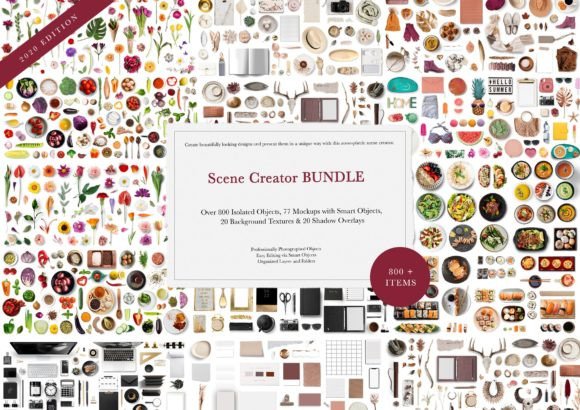
When we talk about volume, the Scene Creator MEGA BUNDLE delivers. You are looking at over 800 isolated PNG objects. These are not low-resolution cutouts with jagged edges; they are high-resolution elements meticulously removed from their backgrounds to ensure clean integration into your projects. The "Flat Lay" aesthetic is particularly popular in editorial design and packaging design, and this bundle leans heavily into that style. You get the tactile feel of real-world objects—stationery, technology, flora, and decorative items—without the hassle of photography.
Beyond the individual objects, the bundle includes 77 pre-made mockups. For those who need a quick turnaround, these mockups are invaluable. However, the true power lies in the customization. The bundle includes 20 backgrounds and 20 shadow overlays. These aren't just afterthoughts; they are crucial for grounding your composition. A shadow overlay can make the difference between a flat, digital-looking graphic and a premium visual that feels tangible and textured.
Where This Bundle Fits in Your Workflow
Understanding where to apply these assets is key to maximizing their value. This isn't limited to just one niche; it spans across almost every digital and print medium imaginable.
- Social Media Graphics: Create unique headers, slides for carousels, or promotional posts that stand out in a crowded feed. Instead of using the same stock photo as your competitor, you can build a scene that is uniquely yours.
- Website Banners and Blog Posts: Web design relies heavily on imagery. Use these elements to create custom hero images that align perfectly with your article's tone or your site's color palette.
- Digital Scrapbooks and Branding Boards: For graphic designers presenting concepts to clients, a well-constructed branding board is essential. This bundle allows you to visualize how a logo, color scheme, and typography work together in a real-world context.
- Marketing Materials: Whether it’s a flyer, a brochure, or a digital ad, the ability to manipulate elements (move, rotate, scale) means you can direct the viewer's eye exactly where you want it.
Mastering the Aesthetic: Style and Personality
The visual language of the Scene Creator MEGA BUNDLE is modern, clean, and sophisticated. It avoids the overly "stock" look that can cheapen a brand. Instead, it leans towards a lifestyle aesthetic that feels curated. This style works exceptionally well for brands that want to convey professionalism, creativity, and attention to detail.
One of the most significant advantages here is the ability to control the visual hierarchy. In design, hierarchy dictates what the audience sees first. By scaling objects, you can create focal points. By using the provided shadow overlays, you can create depth that separates the foreground from the background. This level of control is usually reserved for those with advanced Photoshop skills or photography studios, but the bundle's organized layers make it accessible. The included PSD file contains smart object layers, meaning you can update mockups with your own designs (like a book cover or a business card) in seconds.
Practical Application: From Concept to Final Design
Let’s look at a realistic scenario. You are launching a new digital product, perhaps an online course. You need visuals for the sales page, the checkout page, and a promotional email sequence. You need the imagery to feel cohesive.
Using the Scene Creator MEGA BUNDLE, you start with one of the 20 backgrounds—perhaps a clean marble texture. You drag in a laptop mockup from the 77 available options. Because of the smart object layers, you easily paste your course dashboard screenshot onto the laptop screen. Next, you add a coffee cup, a notepad, and a plant from the 800+ PNG objects to frame the laptop. You rotate the plant slightly to guide the eye inward. You add a shadow overlay to give the scene depth.
For the next post in your sequence, you use the same background but change the arrangement of the objects. Maybe the laptop is closed, and the notepad is now the focus. You have just created two distinct, yet perfectly consistent, marketing assets. This consistency is vital for brand recognition. It signals to your audience that you are organized and professional.
Technical Details That Matter
For the technical users, the specifications are robust. The elements are organized into their own layers and folders, which keeps your workspace clean—a small detail that saves a lot of headaches during production. The resolution is high enough for print, meaning you aren't limited to digital use. You could use these elements to design a physical menu, a product catalog, or packaging inserts.
It is important to note that to utilize the full functionality—specifically the smart object layers in the mockups—you will need photo editing software that supports these features, such as Adobe Photoshop. While you can use the PNGs in almost any graphic design software (like Canva or Affinity Photo), the automated mockup features rely on the PSD structure.
Why Customization Beats Stock Photography
In a saturated market, generic visuals get ignored. The Scene Creator MEGA BUNDLE allows you to bypass the "generic" trap. Instead of searching for a "flat lay of a workspace," you build the exact workspace that represents your ideal client. You can match the objects to your brand's specific vibe—minimalist, colorful, rustic, or corporate.
This asset is particularly useful for content creators and bloggers who need to produce a high volume of visuals but may not have the budget for a professional photographer for every single post. It bridges the gap between amateurish smartphone photos and expensive professional shoots. It provides a middle ground that looks polished and intentional.
Ultimately, this is a toolkit for visual problem-solving. It empowers you to stop compromising on your visuals and start creating exactly what you need. Whether you are building a logo design presentation, a social media strategy, or a website layout, having access to 800+ movable elements ensures that you always have the right piece of the puzzle at your fingertips. It is an investment in your creative autonomy, allowing you to produce elegant, unique, and high-converting visuals on demand.